
Musicca helps you teach music theory. For free. Empower your teaching with interactive exercises, virtual instruments, and online tools that help your students learn at their own pace, both in school and at home, while you track their progress.
Contents
1. Benefits
Here are some of the key benefits of using Musicca:
- Free for schools. Musicca is free for schools, teachers, and students. Create a free account to access all content and remove ads.
- For all skill levels. Musicca helps students learn music theory and improve their skills at all levels, from beginner to advanced.
- Engaging and motivating. Musicca lets students improve their skills in a fun way by adding game elements to the learning process.
- Personalized. Musicca enables students to learn at their own pace through exercises that adapt to their individual needs.
- Time-saving. Musicca offers self-correcting exercises that are easy for students to use and save you time on evaluating students.
2. For educators
With an account you get free access to a set of tools designed to enhance your music teaching with Musicca. With these tools, you can:
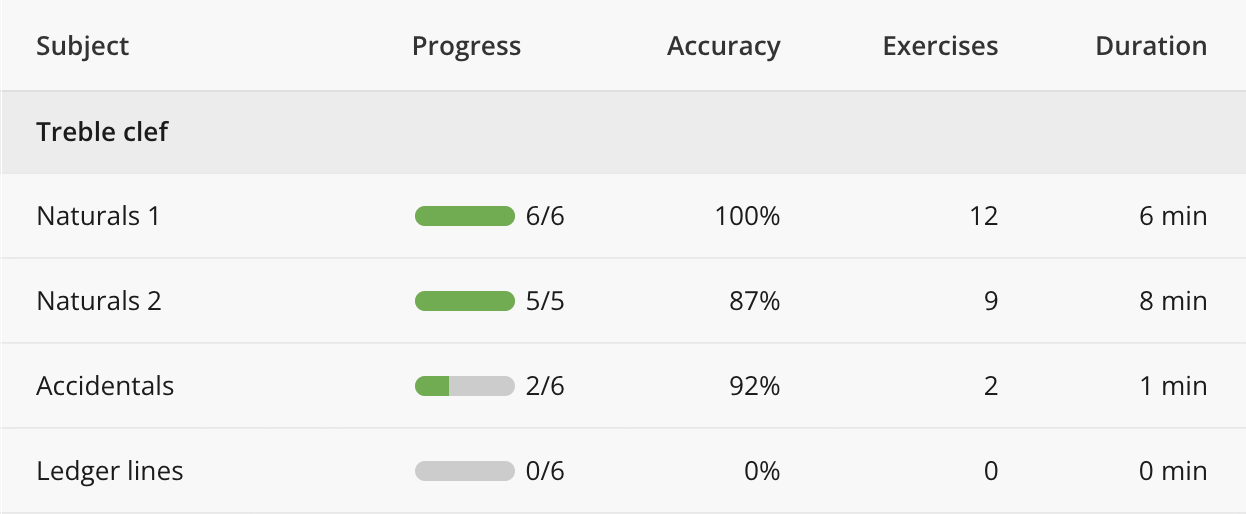
- Track student progress. Track student progress and performance in real-time to see where they excel or need additional support.
- Manage students. Create student accounts, reset passwords if they forget them, and transfer students between classes.
- Manage classes. Create and manage classes to organize your students. Invite students to join your class using a unique class link.
3. Testimonials
More than 10,000 schools in 150 countries use Musicca each month. Here’s what some of our music teachers have to say about their experience.

My students really love using Musicca. It’s a big part of our music classes, so thank you for all the work that you do!

I truly appreciate how Musicca makes it so easy for my students to continue practicing music theory at home.

I am a high school teacher. Thanks for the great tools! I use the virtual piano and guitar with my students and they love it.

I am so happy to have found Musicca’s exercises! I already use them with 120 pupils who regularly work with them.
4. Get started
You can get started with Musicca for schools in just a few steps:
- Create a teacher account. Go to the signup page.
- Create a class. Go to the create class page.
- Create student accounts. You can create accounts for your students from the class page by clicking "Add students" and then "Create accounts". Students can also create their own accounts using the signup page. If minors create their own accounts, we ask for a parent email address to obtain parental consent.
- Invite students to your class. If you created the student accounts, they are added to the class automatically. If students created their own accounts, click "Add students" on the class page to invite them to your class.
- Privacy and data protection. We collect a minimum amount of personal information, and ads are disabled for all signed-in users. We protect personal data in accordance with the GDPR and COPPA. If required by your school, we can sign a data processing agreement. Contact us to learn more.
For more information, please visit the help page for educators.